Blog
LMS Migration Project Plan: A Complete Guide with Adaptable Template
Plan your LMS migration step by step: week-by-week project plan, data mapping matrix, UAT checklist, and a multi-region rollout template. Updated 2026.

Learn how LMS integration with Salesforce works, which architecture eliminates nightly syncs, and how to evaluate AppExchange LMS apps before you commit.
Plan your LMS migration step by step: week-by-week project plan, data mapping matrix, UAT checklist, and a multi-region rollout template. Updated 2026.

Learn how retail chains use a Learning Management System to train frontline staff on new products and promotions by location, even with high turnover.

Learn how a partner training LMS keeps distributors, vendors, customers, and contractors in separate branded portals with isolated reports and certifications.
Request a quote and our experts will contact you within 24 hours with tailored solutions and pricing.
You can also send us a quick email at sales@maplelms.com.
MapleLMS
Last updated: Oct 12, 2026
By Surbhi Bhatia, Content Coordinator, MapleLMS | Reviewed by the MapleLMS Solutions Team
LMS integration with Salesforce is the connection that lets a Learning Management System (LMS) write completion and certification records directly into a Salesforce org - so training data appears on the rep's record without a manual export, a second login, or a batch job that fails at 3 a.m.
If your reps live in Salesforce, a separate training platform creates friction, stale dashboards, and real compliance risk. The average enterprise uses 897 applications and only 29% of them are connected, according to Salesforce's State of Data and Analytics report (Salesforce, 2025). A disconnected LMS is one of the most avoidable contributors to that gap.
This guide explains the two architectures behind every Salesforce LMS option, the API and authentication realities that determine whether "real-time" actually means real-time, and a practical checklist for evaluating any AgentExchange listing before you sign.
Key Takeaways
- Two architectures exist: a native LMS (completions are Salesforce objects, zero sync) versus an integrated LMS (external database, data pushed via API). Architecture determines latency, security exposure, and admin overhead.
- Salesforce removed the OAuth 2.0 Device Flow on September 2, 2025, and began blocking uninstalled Connected Apps by default - any LMS connector built on those patterns must migrate to External Client Apps.
- A polling-based LMS connector at 5-minute intervals burns 288 idle API calls per day per instance before transferring a single completion record (ForcenautSF, 2026).
- 94% of sales leaders say training positively impacts revenue growth (Alexander Group via Solofire, 2025) - making real-time completion visibility a strategic priority, not an IT preference.
- A deactivated Salesforce user keeps LMS access until the next sync in an integrated architecture - a security gap native deployments close immediately.
Two fundamentally different architectures underlie every AppExchange LMS listing - and the choice determines latency, security exposure, and admin overhead. A native LMS stores completions as Salesforce objects inside your org. An integrated LMS keeps learner records in an external database and syncs them in. The average enterprise uses 897 applications and only 29% are connected (Salesforce, 2025) - architecture determines whether your LMS closes that gap or widens it.

Native LMS is an LMS that runs entirely within your Salesforce org using standard Salesforce objects and permissions. A completion record is a Salesforce object the moment it is written. No API call crosses an org boundary. No external database stores learner data. No sync job can fail silently. Single Sign-On (SSO) - the authentication method that lets a user access multiple systems with one set of credentials - is automatic because the LMS inherits Salesforce authentication.
Integrated LMS is an LMS that maintains its learner database outside Salesforce and pushes data in via API. That push happens either on a schedule (nightly batch) or in near-real-time via webhooks. The integration is a maintained dependency: it requires a credential, respects API governor limits, and breaks when either side changes an API contract.
The table below shows the key differences at a glance:
| Dimension | Native LMS | Integrated LMS |
|---|---|---|
| Learner database location | Inside the Salesforce org | External server or cloud |
| Completion latency | Instant (same transaction) | Seconds to 24+ hours |
| Rep login | Salesforce SSO - one login | Separate LMS credential |
| API calls consumed | Zero for completion writes | Every sync or webhook POST |
| Deactivated-user risk | Immediate access removal | Access persists until next sync |
| Admin overhead | Standard Salesforce admin | LMS admin + integration config |
| Security audit scope | Salesforce org boundary | Org + external system + data in transit |
As one Salesforce-native LMS practitioner guide puts it: "If any part of the learner database sits outside your org and gets synchronized in, the product is integrated, not native, whatever the marketing says." (Daniwoo.io, 2026).
Almost every AgentExchange listing describes itself as "integrated with Salesforce" - and some use the word "native" loosely. The evaluation checklist later in this guide shows exactly what to verify.
Nightly sync leaves a gap between what happened in training and what Salesforce shows - and that gap carries commercial and compliance risk. Only 54% of business leaders are totally confident the data they need is accessible (Salesforce, 2025). As one AppExchange practitioner put it: "A nightly job errors out partway through, and nobody knows until the next morning's list is short by a hundred names." (Blackthorn.io, 2026).
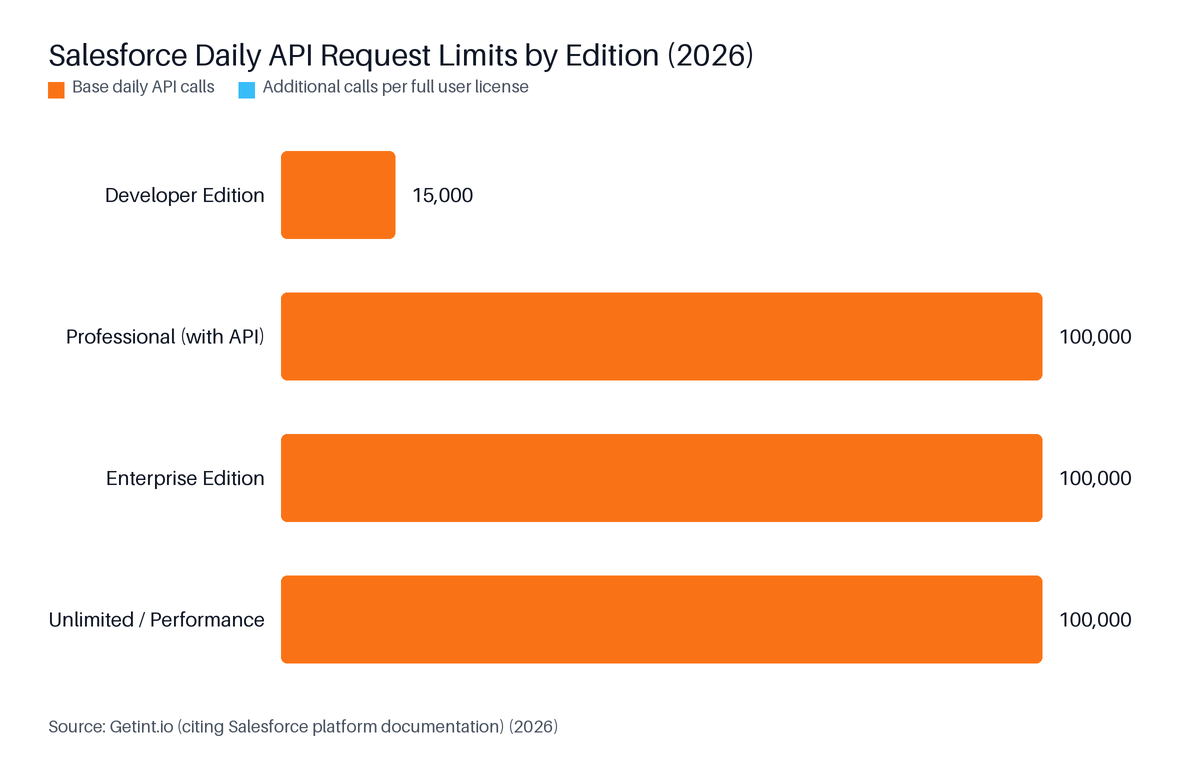
Enterprise Edition orgs receive a base of 100,000 API calls per 24-hour window - a budget a polling connector begins consuming the moment it goes live (Getint.io, 2026).
Source: Getint.io (citing Salesforce platform documentation), 2026
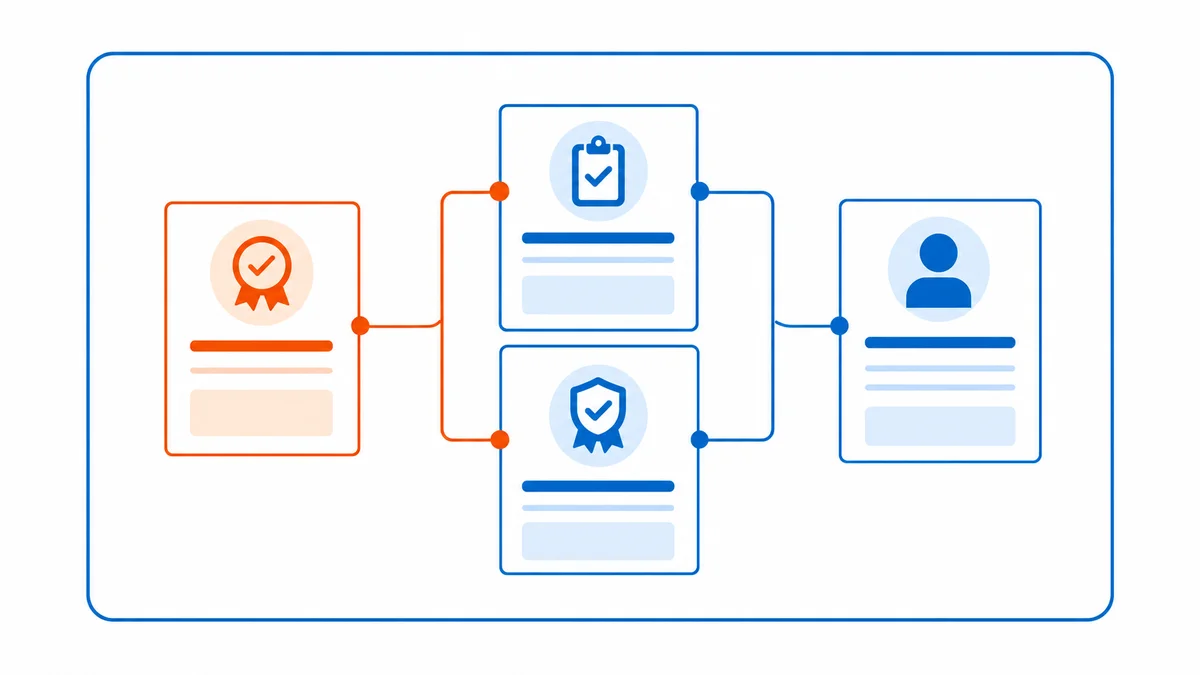
Four failure modes result from a nightly-sync architecture:
The business case for real-time visibility is direct. 94% of sales leaders say training positively impacts revenue growth, per the Alexander Group's 2025 Sales Enablement Survey (Solofire, 2025). Knowing who has and has not completed a certification before a product launch is a commercial priority, not an IT preference.
Connecting Salesforce to a Learning Management System (LMS) without a nightly sync means choosing a native LMS - where completions are Salesforce objects from the moment they are written - or using REST API webhooks with OAuth 2.0 Client Credentials Flow. A polling connector at 5-minute intervals burns 288 idle API calls per day per instance (ForcenautSF, 2026) before a single completion moves.

A 100% native LMS stores every completion, certification, and SCORM (Sharable Content Object Reference Model - the standard that defines how course content reports completion and score data to an LMS) record as a standard Salesforce object inside your org. No data crosses an org boundary. A rep completes training on their phone during a commute, and the Salesforce record updates in the same transaction.
Our data (Cornerstone migration, Life Sciences, anonymised): MapleLMS cut compliance tracking time from 5 days to under 1 day for a 150,000+ learner organisation spanning North America, Europe, and APAC. Training completion rates rose from 68% to 91%. Reporting turnaround moved from 2-3 days to real-time.
Practical implications for a Salesforce admin:
If your organisation is committed to an external LMS, a webhook architecture is the closest alternative to native. The LMS POSTs a completion event to Salesforce via a REST API endpoint the moment it is recorded. Salesforce Platform Events - a publish-subscribe messaging framework built into Salesforce that lets external systems receive real-time notifications without polling - extend this further: the LMS publishes a completion as an event, and a Salesforce Flow subscribes and writes it to the correct object.
Choosing the right API pattern:
| Scenario | Recommended pattern | Why |
|---|---|---|
| Individual completions as they happen | REST API webhook + Platform Event subscriber | Sub-second latency, no polling |
| 10,000+ completions in a training blitz | Bulk API 2.0 (asynchronous batch) | Avoids per-record API call cost |
| Scheduled overnight report sync | REST API batch job | Simpler, but nightly-sync limitations apply |
| Native LMS | No external API needed | Completion is already a Salesforce object |
Bulk API 2.0 is Salesforce's asynchronous API for processing large volumes of records in a single job. It is the right choice when thousands of completions arrive in a short window - a product-launch training blitz, for example.
Some teams use a middleware layer to translate between the LMS's API and Salesforce. This works, but adds a third dependency to maintain, monitor, and pay for. The polling problem often resurfaces inside the middleware. For most Salesforce-first commercial teams, the decision comes down to two paths:
Use the 15-question evaluation checklist below before signing with any vendor.
In September 2025, Salesforce removed the OAuth 2.0 Device Flow entirely and began blocking uninstalled Connected Apps by default, cutting off any LMS connector that had not been formally installed by an admin (Concret.io, 2025). The correct replacement is the External Client App with Client Credentials Flow. In February 2026, Salesforce published an automated migration path in App Manager that preserves existing OAuth credentials so vendors can upgrade without forcing customers to re-credential.
Before September 2025, an external LMS could authenticate to Salesforce using several patterns. Here is where each stands today:
| OAuth pattern | Status as of September 2025 | Notes |
|---|---|---|
| Device Flow | Removed entirely (Sept 2, 2025) | Connectors using this pattern stopped working |
| Username-Password Flow | Retired | Enforcement expanding; will stop working |
| Web Server Flow (PKCE) | Still supported | Requires user context; suited to rep-initiated actions |
| Client Credentials Flow (External Client App) | Now mandated for server-to-server | No user context; correct pattern for backend sync |
External Client App is Salesforce's replacement for the legacy Connected App model. It enforces tighter OAuth governance, including blocking uninstalled apps by default. Salesforce's own architecture guidance is direct: "These integrations should be refactored to supported patterns, such as OAuth 2.0 Client Credentials for server-to-server integrations." (Salesforce, 2026).
Salesforce also retired the OAuth 2.0 username-password flow for Connected Apps (Salesforce Help, 2025). Any LMS integration still using that pattern will stop authenticating once retirement is fully enforced.
Before signing with any LMS that uses a Salesforce connector, ask these four questions:
A vendor that cannot answer questions 1 and 2 clearly has likely not migrated. Question 3 reveals how the vendor handles platform change management.
Salesforce Enterprise Edition orgs receive a base of 100,000 API calls per 24-hour rolling window plus 1,000 calls per full user license (Getint.io, 2026). A polling-based LMS connector at 5-minute intervals consumes 288 idle calls per day per instance (ForcenautSF, 2026) - 10 concurrent instances burn 2,880 calls before any completion data moves. Architecture choice determines whether a training blitz becomes an API incident.

Consider an org with 500 licensed users on Enterprise Edition:
For a product launch where 5,000 reps complete a certification in a single afternoon, a REST API webhook architecture fires 5,000 sequential calls in a short window. Bulk API 2.0 batches those 5,000 records into one asynchronous job, consuming far fewer calls against the daily limit. The pattern chosen at design time determines whether that afternoon becomes a support incident.
Set up the following before go-live:
A native LMS eliminates this entire category. Completion writes consume no external API calls - nothing to poll, nothing to fail.
Evaluating an AppExchange Learning Management System listing means checking the Security tab, data-flow documentation, and version history - not just the marketing copy. The decisive question: do learner records live inside your Salesforce org or in an external database? With 94% of sales leaders saying training positively impacts revenue growth (Solofire, 2025), choosing the wrong architecture is a commercial risk, not just a technical one.
Our data: MapleLMS holds a 4.96 rating across 92 reviews on the Salesforce AgentExchange, and a 4.8 out of 5 on G2 (17 reviews, 85.7% mid-market segment). Those ratings reflect production deployments, not demo environments.
Use these 15 questions when reviewing any AgentExchange listing:
Architecture (most important category)
Authentication
Performance and limits
Security and identity
Operational
| Question | Native LMS answer | Integrated LMS answer |
|---|---|---|
| Where do completions live? | Salesforce objects, inside org | External database, synced to org |
| How fast do they appear? | Instantly | Seconds to 24 hours |
| What governs deactivation? | Salesforce permissions - immediate | Sync delay creates access window |
| Who owns data residency? | Your Salesforce org | Vendor's external hosting |
| What happens if the sync fails? | N/A - no sync exists | Records become missing or stale |
The integration maintenance cost is easy to underestimate. The table below frames the comparison with labelled assumptions - your numbers will vary by team size and hourly rate:
| Cost category | Native LMS | External LMS + connector |
|---|---|---|
| Monthly admin hours for integration maintenance | 0 (no connector exists) | 4-12 hrs (monitoring, error resolution, upgrades) |
| API overage risk | None | Present - polling erodes budget |
| Credential re-setup after OAuth change | Not applicable | Required (as in Sept 2025 Device Flow removal) |
| Separate LMS admin licence / tool cost | Not applicable | Vendor-dependent; often additional |
| Security audit scope | Salesforce org only | Org + external system + data in transit |
The September 2025 OAuth change that forced integration teams to re-credential connectors is a concrete example of the hidden maintenance cost. A native LMS carries none of it.
For a product-level overview of LMS options that connect with Salesforce, the MapleLMS guide to LMS solutions with Salesforce integration covers five specific platforms with their key features.
When a Salesforce user is deactivated in an org running an external Learning Management System on a nightly sync, that rep keeps full LMS access for up to 24 hours. A native LMS eliminates this window: deactivation immediately removes LMS access through the same role-based permissions that govern every other Salesforce object. Only 54% of business leaders are totally confident the data they need is accessible (Salesforce, 2025) - identity drift makes that confidence problem worse.
Our data (CMAX case study): At CMAX, an Australian early-phase clinical research organisation with approximately 500 internal and external users, role-based provisioning tied directly to Salesforce achieved 86% user adoption - with competency-linked assignments aligned to role-specific requirements from day one.
Our data (Casa Pharma Rx case study): At Casa Pharma Rx, a 503A licensed compounding pharmacy in Stafford, Texas, role-based mobile-accessible product training for sales and customer-service teams reached 96% user adoption - showing that tight Salesforce-driven provisioning accelerates adoption rather than constraining it.
Identity drift is the state in which Salesforce and an external LMS disagree on who is an active user. It accumulates every time someone is added, changed, or deactivated without triggering an immediate LMS update. Three specific risk scenarios:
If switching to a native LMS immediately is not possible, this pattern reduces the deactivation window substantially:
IsActive field changes to False.User_Deactivated__e - with the user's ID and timestamp.This reduces the deactivation window from hours to seconds. Confirm the LMS vendor supports Pub/Sub API subscriptions before implementation.
LMS integration with Salesforce suits cloud-based deployments for commercial and field-force training. It is not the right fit for organisations where training must live inside a single-vendor electronic quality management system - with SOP release triggering retraining inside the same document-control and corrective-and-preventive-action workflow. On-premise Learning Management System deployments and immersive VR or AR programmes are also outside this architecture's scope.
Specifically, a Salesforce-native LMS is not the right fit if your primary requirement is one of the following:
If your requirement is to connect training data to commercial performance data, deliver field-force certification at scale, and give managers real-time visibility inside Salesforce - that is the use case this architecture is built for.
Syncing an external Learning Management System with Salesforce requires a REST API connection using OAuth 2.0 Client Credentials Flow - the server-to-server pattern Salesforce mandates after removing Device Flow in September 2025. Real-time completions use Platform Events or webhooks; high-volume batches use Bulk API 2.0. Enterprise Edition orgs receive a base of 100,000 API calls per day plus 1,000 per user license (Getint.io, 2026), and a 5-minute polling connector burns 288 idle calls per day before any real data moves (ForcenautSF, 2026).
AppExchange Learning Management System apps split into two architectures. Native apps store completions and certifications as standard Salesforce objects inside your org - no external database, no sync job. Integrated apps maintain an external learner database and push data in via a connector. As one practitioner guide states: "If any part of the learner database sits outside your org and gets synchronized in, the product is integrated, not native, whatever the marketing says." (Daniwoo.io, 2026). Check the AgentExchange Security tab to verify.
OAuth 2.0 Client Credentials Flow is the correct pattern for server-to-server LMS integration in 2026. Salesforce eliminated Device Flow on September 2, 2025, and has retired the username-password flow (Salesforce Help, 2025). Client Credentials Flow authenticates using a client ID and secret without a user context - ideal for background processes posting completion records. Salesforce's own guidance states: "These integrations should be refactored to supported patterns, such as OAuth 2.0 Client Credentials for server-to-server integrations." (Salesforce, 2026).
Yes. When a completion record is written to a Salesforce object - natively or via webhook - a record-triggered Salesforce Flow fires immediately. Common actions include auto-enrolling the rep in the next certification path, updating a certification field on the Contact or Opportunity, or sending a manager notification. Native Learning Management System deployments make this straightforward because the completion is already a Salesforce object. Integrated deployments require the Flow to wait for the completion to arrive via sync or webhook.
Salesforce removed the OAuth 2.0 Device Flow on September 2, 2025, and began blocking uninstalled Connected Apps by default (Concret.io, 2025). Any Learning Management System integration built on Device Flow or an uninstalled Connected App lost authentication until migrated to the External Client App model. In February 2026, Salesforce published an automated migration path in App Manager that preserves existing OAuth credentials, so vendors could upgrade without forcing customers to re-credential their integrations (Salesforce, 2026).
The choice between a native LMS and an integrated LMS is not a minor configuration detail. It determines whether reps need a second login, whether completions appear instantly or hours later, whether a departing employee's access is revoked immediately, and whether your Salesforce admin manages one system or two.
Five things to carry into any LMS evaluation:
To see how a 100% native Salesforce LMS handles completions, certifications, and real-time dashboards - without a single sync job - book a demo with MapleLMS and bring your Salesforce admin to the call.
Continue learning: